Skip to content
vs

AppuBot vs Grok Bot: a free alternative on your own computer

Grok Bot rents your bots a cloud computer. AppuBot puts them on yours, free during early access, with the AI you choose.

By Sarthak Gupta · Updated

The short answer

Both give you named AI bots that do real work, but they work in different places. Grok Bot runs every bot on one cloud computer that xAI's partner Cursor hosts, picks the model for you, and comes with The X Subscription's Premium ($30 a month), Super ($100) or Ultra ($200) plans. AppuBot runs bots on your own Mac, Windows or Linux computer, in the apps you already use, with the agent you choose (Grok included), and it is free during early access. Pick Grok Bot if you don't want to keep a computer on; pick AppuBot if you want your own apps, files and AI plan.

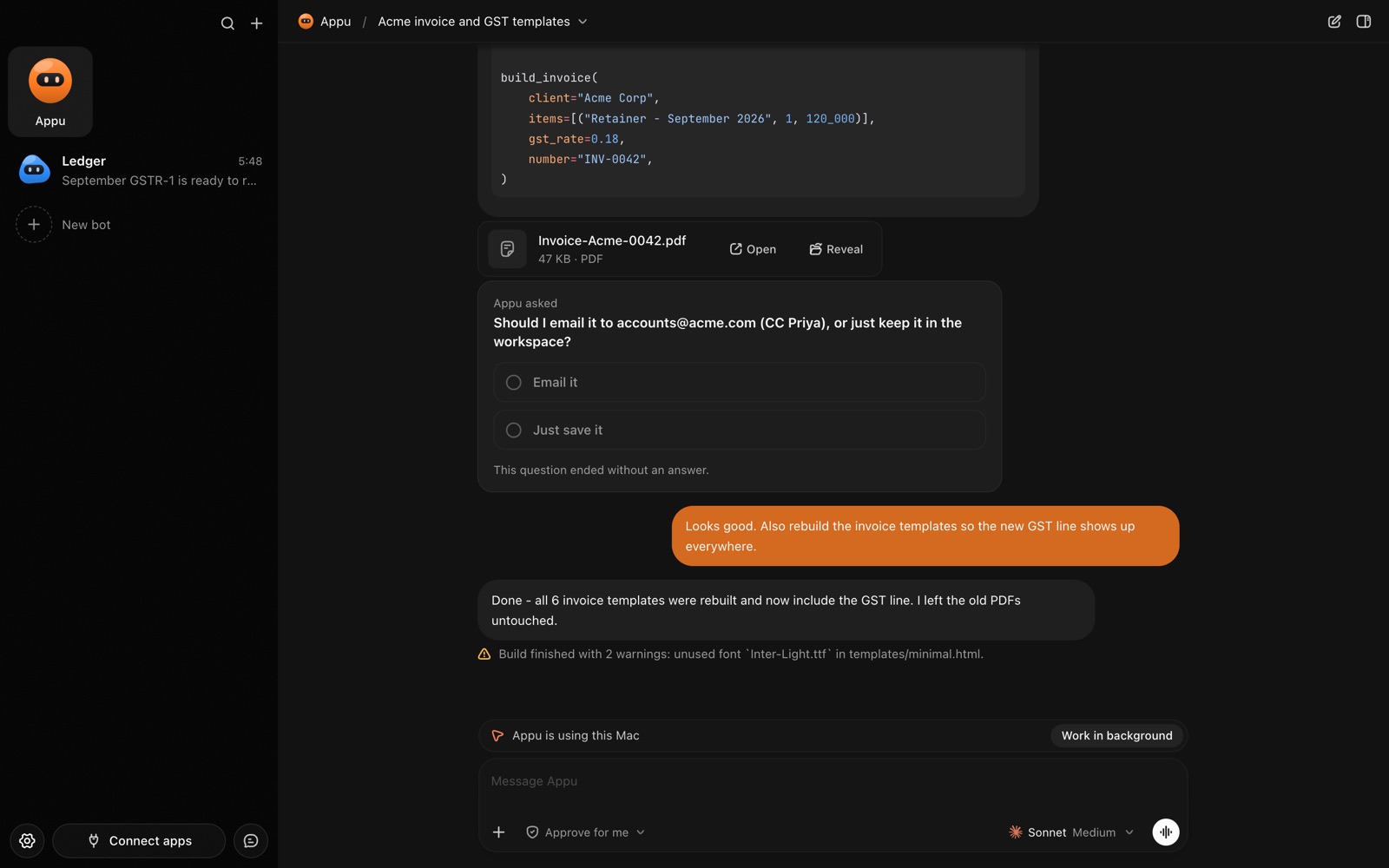
An AppuBot chat while the bot is using the Mac, with a Work in background button
While a bot uses your computer, the chat says so.

At a glance

AppuBotGrok Bot
PriceFree during early access; you use the AI plan you already haveIncluded with Premium ($30), Super ($100) or Ultra ($200) a month on The X Subscription; extra usage from prepaid credit
Where bots workOn your own computer, in its real app windowsOn one persistent cloud computer (browser, files, terminal) shared by all your bots, run in the US
Your own computerAny app: Excel, Numbers, Finder, TallyPrime, XcodeCan run commands on your desktop if you allow it; asks each time by default
AI modelsYour pick per bot: Claude Code, Codex, Cursor, Grok, GitHub Copilot, OpenCode and moreGrok Bot picks the model for each task; there is no model picker
Works with your computer offNo, your computer has to be onYes, cloud work goes on with your laptop closed
PhoneTelegram, one Telegram bot per AppuBot botiPhone and Android apps; shared Bots in Slack; tag @bot on X
Learn by watchingTeach mode: do it once, it saves a skillWalk a bot through a task once, it saves a skill
Your dataStays on your computerOn the cloud computer and Cursor’s servers

Grok Bot facts from xAI’s and Cursor’s documentation, checked 29 October 2026. Prices from press coverage of The X Subscription launch.

How much does each cost?

Grok Bot doesn't have a price of its own. Since October 2026 it comes with The X Subscription, xAI's one plan for Grok, Cursor and X: it's included on Premium ($30 a month), Super ($100) and Ultra ($200), and not on Plus or Free. Grok Bot draws from a weekly pool it shares with Grok and Cursor; past that, extra use is paid from prepaid credit. Older Cursor and SuperGrok plans still include it for people who haven't switched.

AppuBot is free during early access: no AppuBot account, no card. Your bots run on an AI plan you may already pay for, such as Claude Pro or ChatGPT Plus, through your own AI account. If you already have SuperGrok or a Grok account, a Grok bot in AppuBot uses that. Paid AppuBot plans come later; nothing you set up now goes away.

Where does the work happen?

This is the real difference. Each Grok Bot works on a persistent cloud computer with a browser, files and a terminal. All your bots share that one computer, its files and its signed-in sites, and xAI's docs say it runs in the United States. You sign each website in again on that computer, and when a step needs a password or a passkey, the bot hands you the cloud computer to finish it. With your permission it can also run commands on the Mac or PC in front of you, asking each time by default.

An AppuBot bot works on your own computer, so your files, your signed-in apps and your local network are already there. With computer use it opens any app, reads its window, finds buttons and fields by name and clicks, types and scrolls, many steps per turn. That reaches desktop apps a cloud browser can't: Excel, Numbers, Final Cut Pro, accounting software, an internal tool on your office network. A small pointer with the bot's face shows each click, and you can take over any time, or let it work in the background while you keep using your computer.

Which AI models can each use?

xAI's FAQ is direct about it: Grok Bot picks the model for each task, and there is no model picker. It may use xAI's own models or a third-party model, and the choice can change from one request to the next.

In AppuBot you choose, per bot: Claude Code with your Claude plan, Codex with your ChatGPT plan, Grok, Cursor, GitHub Copilot or OpenCode, plus the model and how hard it thinks. One bot can run on Claude and the next on Grok.


How do you reach your bots from your phone?

Grok Bot has proper apps for iPhone and Android that reach the same bots and cloud computer, plus shared Bots you can message in Slack and tagging @bot in a post on X. That is a real strength: no computer of yours has to be on.

AppuBot has no phone app yet. Instead each bot can have its own Telegram bot: send it text, photos, voice notes or files from anywhere, and replies, questions with buttons, approvals and files come back. Your computer has to be on for the bot to work, so on a Mac AppuBot can keep a laptop awake, even with the lid closed.

What about privacy?

Grok Bot needs cloud storage: your bots' files, browser sessions and logins live on the cloud computer, requests go through Cursor's servers, and with Privacy Mode on, model providers don't keep your data. It has strong team controls on top, such as network policies and an audit log for Enterprise.

AppuBot keeps bots, chats, files and memory on your computer. What leaves is what a bot sends to its own AI provider, the same as using that AI yourself, plus anonymous usage counts (never messages, files or names). There are no AppuBot servers holding your chats.

Who should pick which?

  • Pick Grok Bot if you want bots that keep working with every computer of yours switched off, real phone apps, Slack and X built in, and admin controls for a company. You also get Grok and Cursor in the same plan.
  • Pick AppuBot if the work lives in desktop apps or files on your own computer, you want to choose the AI (and keep paying only for the plan you have), you would rather your data stayed home, or you want to teach a bot by showing it once on your own screen.

Sources

Facts about other products are from their makers’ pages as of 29 October 2026 and may have changed since. Product names are trademarks of their owners.

Questions

Is AppuBot a free Grok Bot alternative?

Yes. AppuBot is free during early access and gives you named AI bots with jobs, memory, routines and Telegram, but on your own computer instead of a cloud one. Your bots use an AI plan you already have, which can be Grok.

How much does Grok Bot cost?

Grok Bot comes with The X Subscription's Premium plan at $30 a month, Super at $100 or Ultra at $200; Plus and Free don't include it. Usage past the weekly allowance is paid from prepaid credit.

Can Grok Bot use the apps on my Mac?

Mostly no. Grok Bot works on its own cloud computer; with your permission it can run commands on your desktop, asking each time by default. AppuBot bots click and type in any app on your Mac, Windows or Linux computer.

Can I use Grok in AppuBot?

Yes. Grok is one of the agents AppuBot runs, signed in with your own Grok account. You can give one bot Grok and another Claude Code or Codex.

Do AppuBot bots work when my computer is off?

No. They work on your computer, so it has to be on. On a Mac, AppuBot can keep a laptop awake, even with the lid closed, so routines and Telegram messages still get answered.

Meet your first bot

An AI teammate that works on your Mac, and tells you on Telegram