Skip to content

Teach an AI a task by showing it once

Do it once while AppuBot watches; your bot learns the steps and repeats them.

By Sarthak Gupta · Updated

The short answer

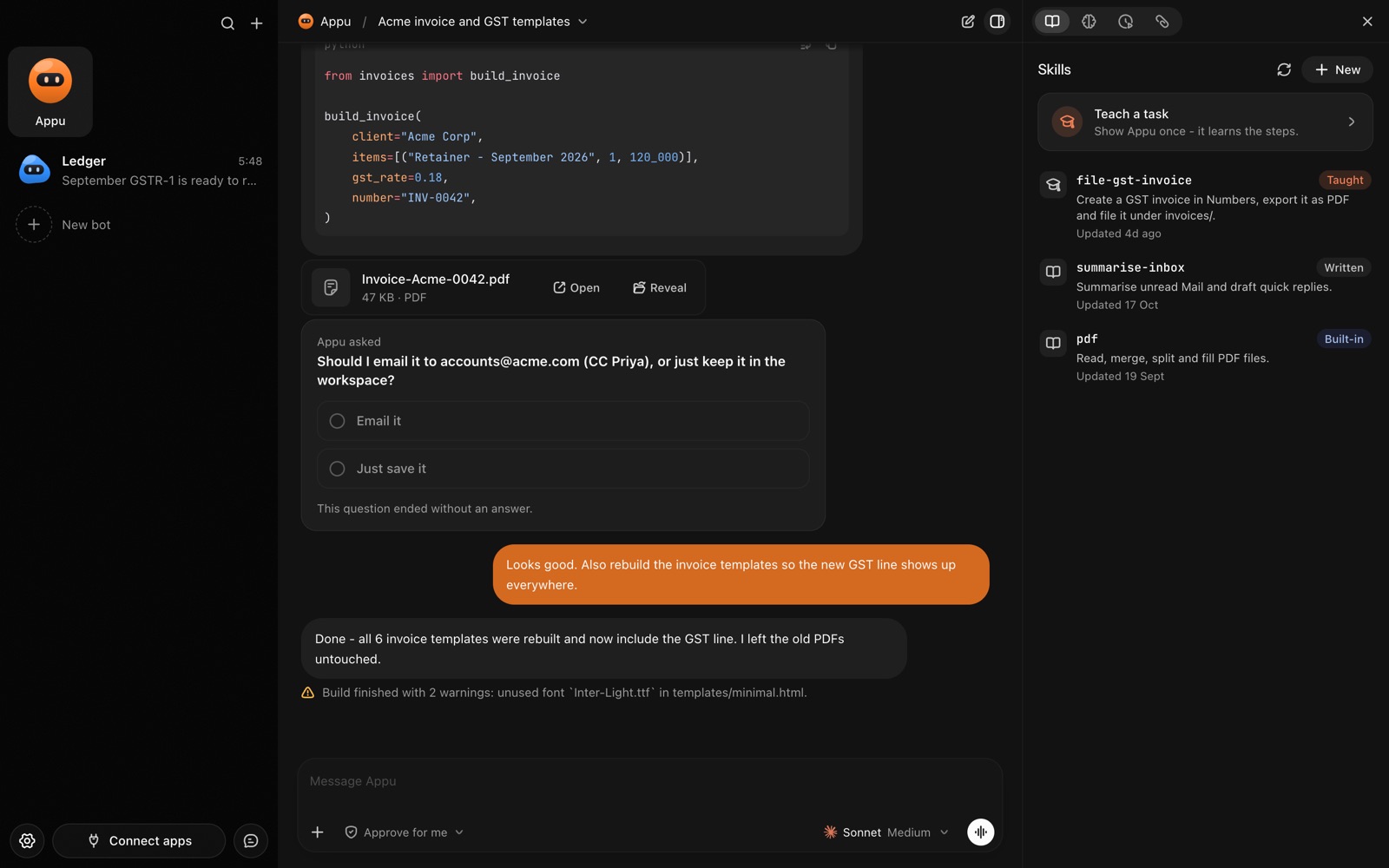
Teach mode lets you show an AppuBot bot how you do something instead of explaining it. Press Teach a task, name it, and do it once in your own apps while AppuBot watches your clicks and typing. The bot turns what you did into a skill, written steps it follows the next time you ask, and you can read and change that skill like any note.

The Skills panel in AppuBot with Teach a task and a skill learned by watching
Teach a task once; the bot keeps it as a skill.

Why show instead of tell?

Some jobs are easy to do and tedious to describe: which menu, which folder, which column the date goes in, what you name the file. Teach mode skips the describing. You do the job once at your normal pace and the bot picks up the details, including the ones you wouldn't think to mention.

How does teach mode work?

  1. Press Teach a task, pick the bot that should learn it and give the task a short, specific name ("File supplier invoices").
  2. Optionally say what done looks like ("every PDF invoice ends up in Invoices/<month>, renamed by vendor").
  3. Press Start recording and do the task once, normally. AppuBot notes where you click, what you type and which keys you press, with a small picture of each click.
  4. Stop when you're done. The bot turns the recording into a skill: the steps, in order, in plain words.
  5. Next time, just ask: "file this month's invoices". The bot follows its skill using computer use.

Good tasks to teach

  • Monthly paperwork. Download a statement from a bank site, rename it and file it.
  • Data entry. Copy new orders from an email into a spreadsheet the way you lay it out.
  • App routines. Export a report from your accounting software with the same filters every time (accounting bot).
  • Posting. Put a prepared post on a site with its images and tags (social media bot).

Pair a taught skill with a routine and the bot does it on a schedule without being asked.

Can I see and change what it learned?

Yes. A skill is plain text you can open in the bot's settings, edit, or delete. If the bot does a step differently than you want, change the sentence; if the app changes, show it again.

If recording isn't possible on your computer (some Linux setups), teach mode asks you to write the steps instead, and the bot turns them into a skill the same way.

What does AppuBot record, and where does it go?

Only what you do between Start and Stop: clicks, typed text, keys and a picture of the window at each click. It stays on your computer and goes to the bot's own AI provider only to write the skill, as when you share a screenshot with that AI yourself. On a Mac, recording needs AppuBot's Accessibility and Screen Recording permissions, the same ones computer use needs.

Tips for a clean recording

  • Start from the beginning. Have the app closed or on its first screen, the way it will be when the bot starts.
  • Go at a normal pace. There is no need to slow down; the bot reads the steps, not the speed.
  • Avoid detours. If you make a mistake, finish anyway; you can fix that step in the skill afterwards.
  • Use the goal box. A sentence about what done looks like helps the bot check its own work next time.
  • Teach the variable parts in words. If the month or the client changes each time, say so in the goal, and the bot fills it in when you ask.

Questions

Can I teach the same bot several tasks?

Yes. Each task becomes its own skill, and the bot picks the right one from what you ask.

Do I need to know how to code to teach a bot?

No. You just do the task; the skill is written in plain words, not code.

How long can a recording be?

As long as the task takes. Short, focused tasks make the clearest skills, so teach a long job as a few smaller ones.

Does teach mode work on Windows and Linux?

Yes. It records on Mac, Windows and Linux; where Linux can't record (Wayland sessions), you write the steps instead.

Can a bot use a skill from Telegram?

Yes. Ask for the task on Telegram and the bot does it on your computer with the skill you taught it.

Meet your first bot

An AI teammate that works on your Mac, and tells you on Telegram