Skip to content
vsOpenBot

AppuBot vs OpenBot: two desktop apps for AI agents, compared

Close cousins: both run your AI plans on your own computer. They differ on computer use, teams, phones and price terms.

By Sarthak Gupta · Updated

The short answer

AppuBot and OpenBot are close: both are desktop apps for Mac, Windows and Linux that run agents like Claude Code, Codex and Grok with plans you already pay for, and keep your chats on your computer. OpenBot is built around a team of agents that talk to each other in channels, with iPhone and Android apps, Slack and Discord, and it's free for noncommercial use. AppuBot is built around bots that do your work in any app on your computer, by clicking and typing in its window, plus Telegram, voice and teach mode, and it's free during early access.

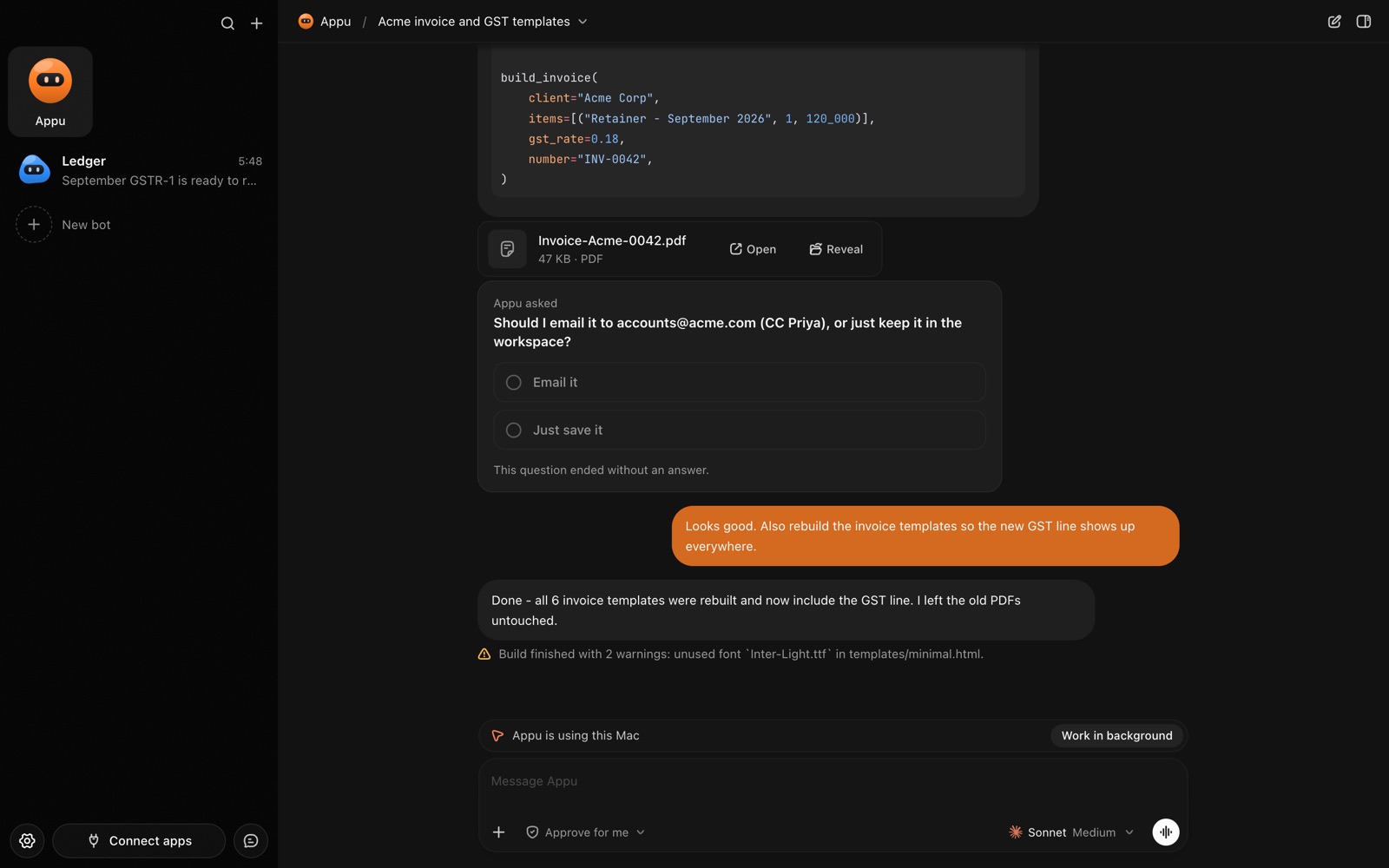
An AppuBot chat while the bot is using the Mac, with a Work in background button
While a bot uses your computer, the chat says so.

At a glance

AppuBotOpenBotOpenBot
PriceFree during early access; no account, no cardFree for noncommercial use; commercial use needs a separate licence. Hosted team servers are paid
Runs onmacOS 14+, Windows (x64, Arm), Linux (x64, arm64)macOS 13+, Windows 10+ (x64), Linux (x64, arm64)
AI it runsClaude Code, Codex, Cursor, Grok, GitHub Copilot, OpenCode, plus more from a catalogCodex, Claude Code, Gemini, Grok, Cursor, OpenCode, Cline, Muse Code, Pi, Mercury, local models
Using your appsComputer use in any app on your computerA built-in browser the agents control, plus files and commands
PhoneTelegram, one per bot, with voice notesiPhone and Android apps; Slack, Discord and Telegram
Agents togetherBots can make and set up other bots (with your OK)Agents hand off work in shared channels; coworkers join a team host
Learn by watchingTeach modeNot described
Your dataStays on your computerStays on the computer that runs it

OpenBot facts from openbot.run, checked 29 October 2026.

What is OpenBot?

OpenBot is a desktop app, made in Poland by Synthetify Labs, that its makers describe as a team of AI agents on your own computer. It doesn't sell a model: each agent runs a tool you already have, like Codex with your ChatGPT plan or Claude Code with your Claude plan, and can switch to a backup model when a plan hits its limit. Its source code is public; it is free for personal projects, study and research, and businesses need a separate commercial licence. It calls itself a development preview, and notes that its agents can change files, run commands and drive the built-in browser without asking each time.

Where they are alike

  • Your AI plan. Both run Claude Code, Codex, Grok, Cursor and OpenCode with the account you are signed in to, so there are no new AI bills.
  • Your computer. Both keep chats, files and agents on the machine that runs them. Requests still go to your AI provider, as with any agent.
  • Persistent agents. In both, an agent has a name, instructions, a folder and its own history, and you can schedule routines.

Where AppuBot is different

  • Computer use in every app. An AppuBot bot opens any app on your computer, reads its window, finds buttons by name and clicks, types and scrolls, many steps per turn, with a pointer you can watch and take over. OpenBot's agents work through a browser built into the app, files and commands. If your work lives in Excel, Numbers or an accounting app, that matters. See computer use.
  • Teach mode. Do a task once while AppuBot watches and the bot saves it as a skill it can repeat. See teach mode.
  • Approvals by default. Each bot can be on Approve for me, asking before anything important and waiting however long you take. See approvals.
  • Connected apps. Sign in once to Gmail, Google Calendar, Notion, Slack and about 1,700 others, then turn each on or off per bot. See connected apps.
  • Free to start. During early access AppuBot costs nothing: no account and no card, and your bots use the AI plan you already have.

Where OpenBot is stronger

  • Phone apps. OpenBot has iPhone and Android apps that reach your agents from anywhere, with no VPN. AppuBot uses Telegram for now.
  • Agent teams. Its agents talk in shared channels, pass work to each other and review each other, and coworkers can join one team host with roles.
  • More model choices. Gemini with a Google AI Pro or Ultra plan, Cline, Pi, local models through Ollama or LM Studio, and an automatic backup model when a plan runs out.
  • Hosted servers. Teams can rent an always-on OpenBot server in the EU instead of keeping a computer on.
  • Public source code that anyone can read.

Which should you pick?

Pick OpenBot for a team of coding and research agents working together, especially if you want phone apps or local models, and your use is personal or noncommercial (or you buy the licence).

Pick AppuBot if you want bots that do everyday work in the apps on your computer, by clicking and typing like you would, reachable on Telegram and by voice, free for work and personal use during early access.

Sources

Facts about other products are from their makers’ pages as of 29 October 2026 and may have changed since. Product names are trademarks of their owners.

Questions

Is OpenBot free?

For noncommercial use, yes: OpenBot costs nothing for personal projects, study or research, and commercial use needs a separate licence. AppuBot is free during early access, with no account and no card.

Can OpenBot use apps on my computer like AppuBot?

OpenBot's site describes agents that control a browser built into the app and work with files and commands. AppuBot bots click and type in any app on your computer, like Excel, Numbers or Finder.

Do both use my Claude or ChatGPT plan?

Yes. Both run Claude Code with your Claude plan and Codex with your ChatGPT plan, so neither needs API keys for those.

Which has a phone app?

OpenBot has iPhone and Android apps. AppuBot has no phone app yet; each bot can have its own Telegram bot instead.

Can I use both?

Yes. They are separate apps, and both can sign in to the same Claude Code or Codex account on one computer.

Meet your first bot

An AI teammate that works on your Mac, and tells you on Telegram