Skip to content
+Claude Code

A Claude Code desktop app for everyday work

Use Claude Code with your Claude plan, in a friendly app that also works in your other apps and on Telegram.

By Sarthak Gupta · Updated

The short answer

AppuBot is a desktop app that runs Claude Code, Anthropic's agent, with the Claude plan you're already signed in to, so there's no API key and nothing new to pay for. You install Claude Code once, sign in, and AppuBot finds it. On top of what Claude Code does on its own, an AppuBot bot can use any app on your computer, answer you on Telegram, talk by voice, run routines and remember what you tell it.

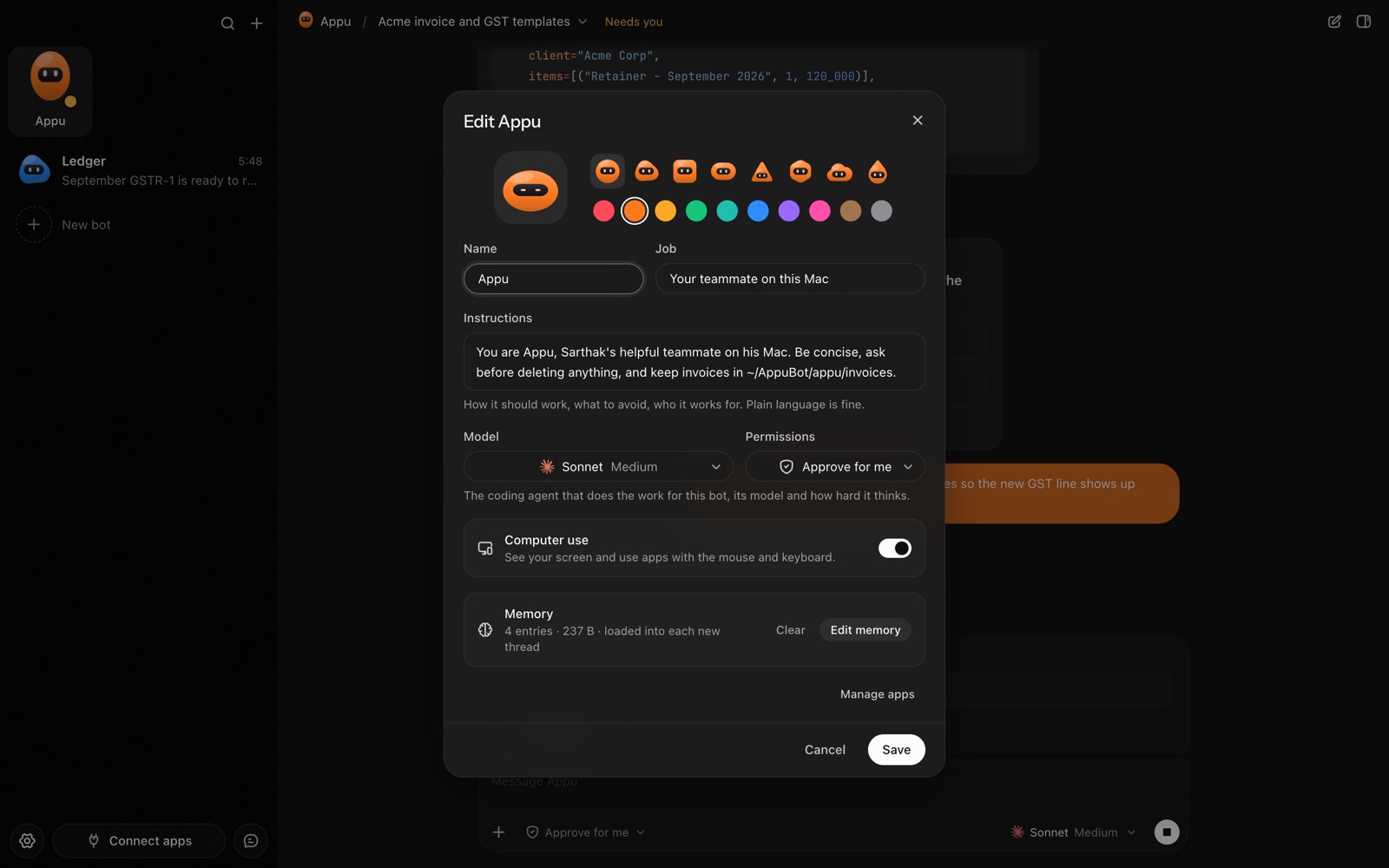
The bot editor in AppuBot: name, look, job, instructions, model, permissions, computer use and memory
Every bot has its own job, instructions, model and memory.

What is Claude Code?

Claude Code is Anthropic's agent. In Anthropic's words it reads your codebase, edits files, runs commands and works with your development tools, and it is available in the terminal, in code editors, in Claude's own desktop app and in the browser. It's built for software work first, and it's very good at it.

What makes it useful beyond code is that it can actually do things on your computer: read and write files, run the steps a task needs and keep going until the job is done. AppuBot takes that ability and points it at everyday work: invoices, spreadsheets, inboxes, research, the apps you use all day.

Which Claude plan does it use?

Claude Code comes with Claude's paid plans. On Anthropic's pricing page, Pro is $20 a month (or $17 a month billed yearly) and Max starts at $100 a month; both include Claude Code, the free plan doesn't. A team or company account with Claude Code works too.

AppuBot uses that same sign-in. Whatever your bots do counts toward your plan's usage like any other Claude Code session, and AppuBot itself is free during early access. Settings › Usage shows how much Claude Code was used on this computer, with an estimated cost, read from your own computer and never sent anywhere.

How do I set up Claude Code in AppuBot?

  1. Download AppuBot and open it.
  2. Install Claude Code if you haven't. Settings › Agents shows it as Not installed with Anthropic's own installer next to it.
  3. Sign in once with your Claude account. If you already use Claude Code on this computer, you are signed in and there is nothing to do.
  4. AppuBot finds it and shows Claude Code as ready. Make a bot, or open an existing one, and pick Claude Code and a model.
  5. Choose the model, how hard it thinks (reasoning effort) and, on models that offer it, Fast mode, for each bot.

AppuBot runs the Claude Code you installed, not a copy of its own, so updates to Claude Code reach your bots too. AppuBot also tells you when a new version is out and can update it for you.

What does AppuBot add on top of Claude Code?

  • Computer use in any app. A Claude Code bot can open an app, read its window and click, type and scroll in it, many steps at a time: fill this month's invoices in Numbers and export them as PDFs. See computer use.
  • Telegram and voice. Message the bot from your phone while you're out and get the finished file back in the same Telegram chat, or ask it out loud in voice mode. Speech is heard and spoken on your own computer. See Telegram and voice.
  • Memory and routines. Each bot keeps a memory you can read and edit, and can run a prompt on a schedule: every weekday at 9, a summary of what came in overnight. See memory and routines.
  • Teach mode and many bots. Show a bot a task once and it saves the steps as a skill (teach mode); make as many bots as you like, each with its own job, folder, chats and agent.
  • Approvals. Pick "Approve for me", where Claude Code's own safety check handles routine steps and anything else waits for you, or "Full access". See approvals.
  • Several Claude accounts. Add your work and personal Claude accounts as profiles and choose which bot uses which.

Claude Code in the terminal vs in AppuBot

Claude Code on its ownClaude Code in AppuBot
Where you use itTerminal, code editors, Claude desktop app, browserAppuBot's window, Telegram, voice, the menu bar
Best atSoftware work in a code projectEveryday work across your apps and files
Using other appsThrough files, commands and tools you connectClicks and types in any app window, plus connected apps
Who it isOne assistant per sessionMany named bots, each with a job, memory and chats
AccountsOne sign-in per setupSeveral Claude accounts side by side
PriceYour Claude planYour Claude plan; AppuBot is free in early access

If you write software all day, Claude Code's own tools (its editor plugins and visual diffs) are made for that. AppuBot is for the rest of your work.

Sources

Facts about other products are from their makers’ pages as of 29 October 2026 and may have changed since. Product names are trademarks of their owners.

Questions

Do I need an Anthropic API key to use Claude Code in AppuBot?

No. AppuBot uses the Claude account you sign in to Claude Code with, so a Pro or Max plan is enough and no API key is needed.

Is AppuBot the same as Claude's own desktop app?

No. Claude's desktop app is Anthropic's, with a Code tab for software work. AppuBot is a separate app that runs Claude Code as named bots that can also use your other apps, answer on Telegram, talk by voice and run on a schedule.

Can I use two Claude accounts?

Yes. Add a second Claude Code profile in Settings › Agents, sign in to it once, and choose per bot which account it uses, for example work and personal.

Does it work on Windows and Linux?

Yes. Claude Code and AppuBot both run on macOS, Windows and Linux, and computer use works on all three.

Which Claude models can a bot use?

The ones your plan offers in Claude Code: AppuBot lists them from Claude Code itself, so new models show up on their own, plus a few earlier versions where your account allows them.

Meet your first bot

An AI teammate that works on your Mac, and tells you on Telegram