Skip to content
+GitHub Copilot

A GitHub Copilot agent on your desktop

Copilot's agent with your GitHub sign-in, as desktop bots that work in your apps and answer on Telegram.

By Sarthak Gupta · Updated

The short answer

AppuBot turns GitHub Copilot's terminal agent into desktop bots: install Copilot for the terminal, sign in with GitHub once, and pick Copilot for a bot. It runs on your Copilot plan, and GitHub's plans page lists the terminal agent on every plan including Free. AppuBot adds computer use in any app, Telegram, voice, memory, routines and approvals.

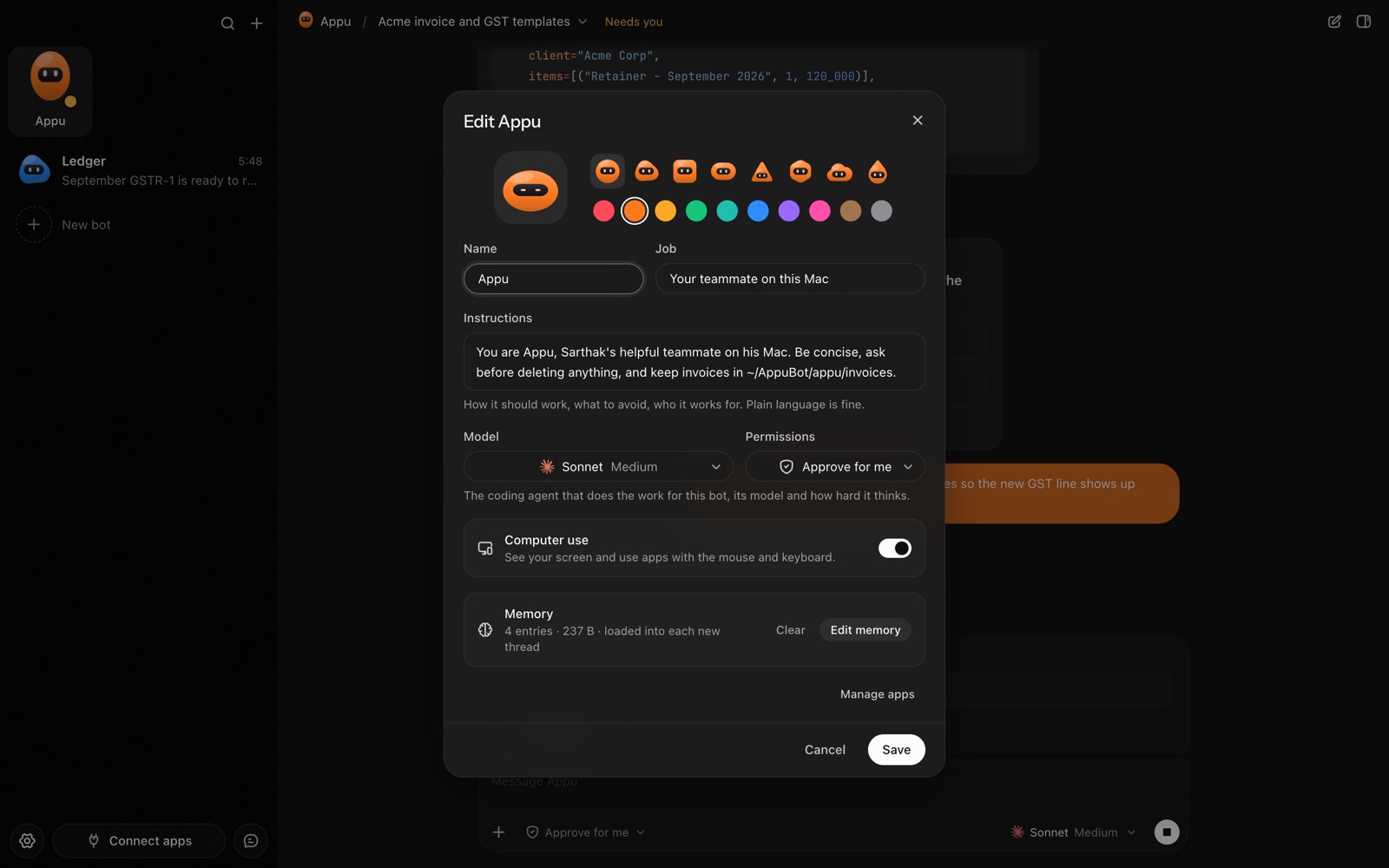
The bot editor in AppuBot: name, look, job, instructions, model, permissions, computer use and memory
Every bot has its own job, instructions, model and memory.

What is GitHub Copilot's agent?

GitHub Copilot started as code completion in your editor and is now also an agent you can run in the terminal, which GitHub calls Copilot CLI. It works with your files and carries out multi-step tasks, using the models your Copilot plan offers.

AppuBot runs that agent. You don't need an editor open: the bot gets a name, a job and its own folder, and Copilot does the work.

Which Copilot plan does it use?

Your GitHub account's. GitHub's plans page lists Free ($0), Pro ($10 a month), Pro+ ($39 a month) and Max ($100 a month), and the terminal agent is included on all of them; paid plans give more requests and more models. Your bots' requests count toward your plan.

If you have Copilot through school or work, that works too, unless your organisation has turned the terminal agent off.

How do I set up GitHub Copilot in AppuBot?

  1. Download AppuBot and open it.
  2. Install Copilot for the terminal with GitHub's installer (Homebrew, WinGet, npm or its script; Settings › Agents shows one when it's missing).
  3. Sign in to GitHub once from Copilot.
  4. AppuBot finds Copilot and lists it as ready. Pick it for a bot and choose a model.
  5. Choose "Approve for me" or "Full access".

AppuBot checks for new Copilot versions and can update it for you from Settings › Agents.

What does AppuBot add on top of Copilot?

  • Computer use in any app. A Copilot bot can open an app, read its window and click, type and scroll in it, many steps at a time: test a sign-up flow in your app the way a user would, and note what broke. See computer use.
  • Telegram and voice. Approve or deny its next step with a button in Telegram. Speech is heard and spoken on your own computer. See Telegram and voice.
  • Memory and routines. Each bot keeps a memory you can read and edit, and can run a prompt on a schedule: every weekday, a list of new issues and what they need. See memory and routines.
  • Teach mode and many bots. Show a bot a task once and it saves the steps as a skill (teach mode); make as many bots as you like, each with its own job, folder, chats and agent.
  • AppuBot's approvals. On "Approve for me", reading and searching go ahead and the rest waits for your OK, in the app or with a button on Telegram. See approvals.
  • Connected apps. Turn on GitHub, Linear, Slack and other connected apps for the bot.

Copilot in the editor vs in AppuBot

Copilot in your editor or terminalCopilot in AppuBot
Made forCoding, reviews, pull requestsEveryday work in your apps and files
Where you talk to itEditor, terminal, github.comAppuBot's window, Telegram, voice
Using other appsThrough code and commandsClicks and types in any app window
SchedulesThrough your own setupRoutines per bot
PriceYour Copilot planYour Copilot plan; AppuBot is free in early access

Sources

Facts about other products are from their makers’ pages as of 29 October 2026 and may have changed since. Product names are trademarks of their owners.

Questions

Does GitHub Copilot Free work in AppuBot?

Yes, as long as Copilot's terminal agent works for your account; GitHub's plans page includes it on Free, with fewer requests than paid plans.

Do I need a GitHub access key or API key?

No. Sign in with GitHub from Copilot once and AppuBot uses that sign-in.

Can a Copilot bot work on things other than code?

Yes. With computer use and connected apps it can fill spreadsheets, sort email, research and file things, like any AppuBot bot.

Does AppuBot show how much Copilot I used?

Yes. Settings › Usage reads Copilot's own records on your computer and shows requests by model, nothing sent anywhere.

Can I use Copilot from work in AppuBot?

Yes, if your organisation allows Copilot's terminal agent; sign in with that GitHub account and pick Copilot for a bot.

Does a Copilot bot ask before changing things?

On Approve for me, yes: reading and searching go ahead and anything else waits for your OK.

Meet your first bot

An AI teammate that works on your Mac, and tells you on Telegram