Skip to content

What are AI agents? A plain-language guide

What an AI agent is, how the loop works, what agents are good at and where they still go wrong.

By Sarthak Gupta · Updated

The short answer

An AI agent is an AI model that works toward a goal by taking actions with tools (searching, reading files, running code, clicking in apps), looking at the result of each action and deciding the next step itself, in a loop, until the task is done or it needs you. A chatbot answers; an agent does. Agents are useful for multi-step work like filling a spreadsheet from emails or testing an app, but they cost more per task than a single answer and their mistakes can compound, so they work best with clear instructions and human approval for anything important.

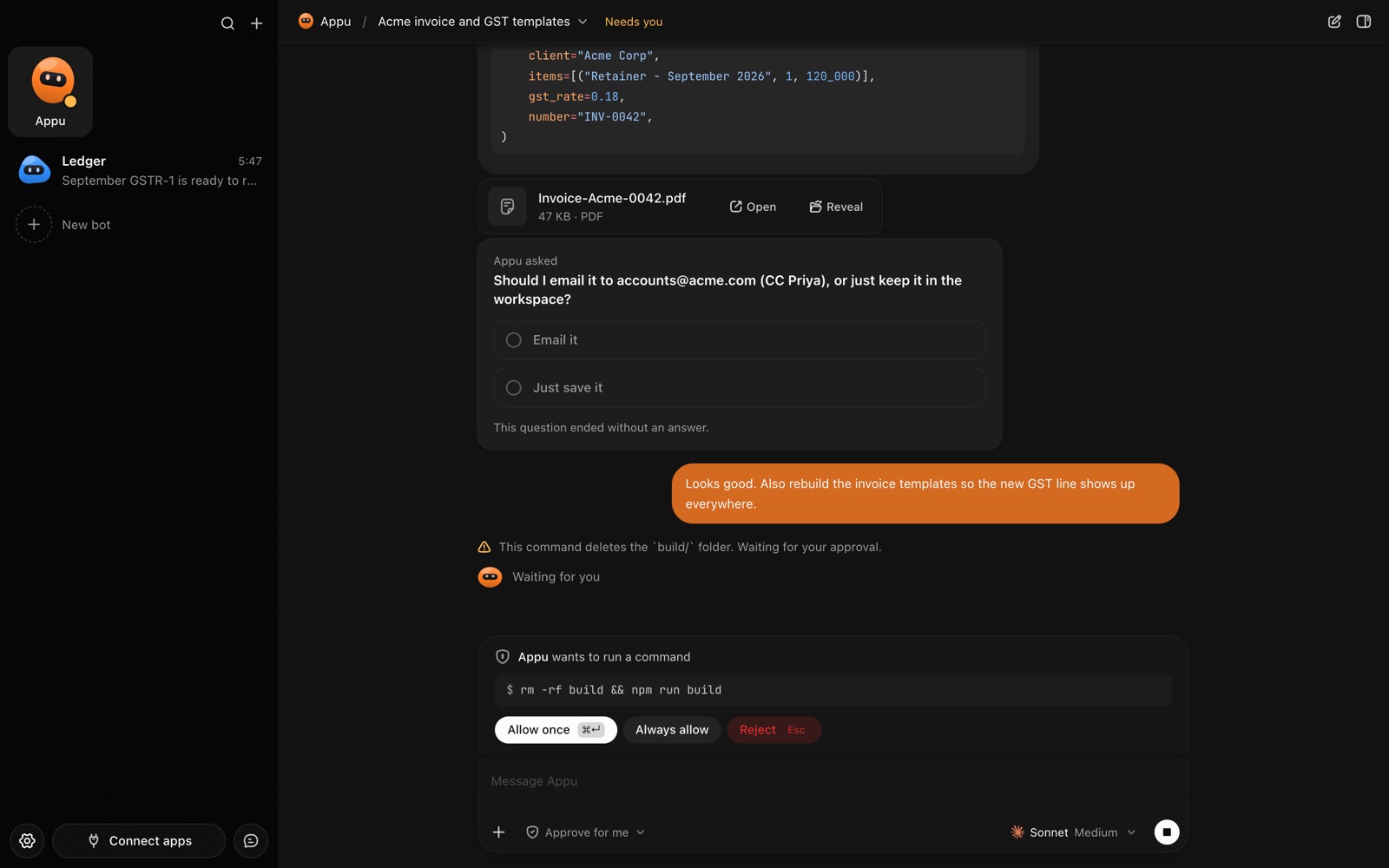
An AppuBot chat: the bot made an invoice PDF, asks a question and waits for approval before running a command
A bot finishing an invoice, asking a question and waiting for your OK.

A working definition

Anthropic, which makes Claude, draws a useful line between two kinds of AI system. In a workflow, a developer decides the steps in advance and the model fills in each one. In an agent, the model "dynamically directs its own processes and tool usage", choosing what to do next based on what it just saw. Anthropic also notes that, under the hood, agents are often simple: a model using tools based on feedback from its environment, in a loop.

So when people say "AI agent" they usually mean three things together: a capable language model, a set of tools it can use, and the freedom to decide the order and number of steps.

How does an AI agent work?

  1. You give it a goal, in plain words: "Make invoices for last week’s unbilled hours and send me the PDFs."
  2. It plans a first step, for example opening the spreadsheet.
  3. It acts with a tool: reads a file, runs a search, calls an app, or clicks in a window.
  4. It looks at the result: the rows it found, an error, a new screen.
  5. It decides the next step and repeats, adjusting when something unexpected happens.
  6. It stops when the goal is met, or pauses to ask you when it hits a decision or a permission it doesn’t have.

The "tools" are what make an agent useful. A model with only a chat box can describe how to do a task; a model with tools can do it.

What kinds of AI agents are there?

KindWhat its tools reachTypical use
Coding agentsFiles, a terminal, a code editorWriting and fixing software
Browser agentsA web browser, often in the cloudBooking, shopping, filling web forms
Computer-use agentsThe screen, mouse and keyboard of a computerWork in desktop apps with no other way in
App-connected agentsAccounts like email, calendar, CRMInbox triage, scheduling, updating records

Many products mix these. The coding agents in particular have become general-purpose: give one a folder and tools and it can do far more than code.

What are AI agents good at today?

  • Repetitive multi-step chores with a clear finish line: move data from A to B, produce a document, file it.
  • Research and reading: searching, cross-checking and summarising with sources.
  • Work across several apps where no integration exists.
  • Things you can check quickly: an agent that saves you an hour and needs two minutes of review is a good trade.

What are the limits and risks?

  • Compounding errors. Anthropic points out that agents’ autonomy brings higher cost and "the potential for compounding errors": a wrong early step can carry through everything after it.
  • Cost and speed. An agent makes many model calls per task, so it is slower and uses more of your AI plan than one answer.
  • Prompt injection. Instructions hidden in a web page, email or image can steer an agent away from what you asked. Anthropic’s computer-use docs warn about exactly this and recommend keeping agents away from sensitive data and asking a human to confirm consequential actions.
  • Access. An agent can do whatever its tools allow. Give it the least access the job needs.

How to start using AI agents sensibly

  1. Pick one boring, well-defined task you do every week.
  2. Write the instructions as you would for a new assistant: inputs, steps, what "done" looks like, what never to do.
  3. Give it only the apps and data that task needs.
  4. Require approval for sending, paying, deleting or posting.
  5. Watch the first few runs, correct it, and only then let it run on a schedule.

Where AppuBot fits

AppuBot is a desktop app that turns the agents you may already have, like Claude Code or Codex, into named bots with a job, instructions and memory, running on your own computer with your existing AI plan. Each bot can work in your desktop apps through computer use, in your accounts through connected apps, and asks before anything important on approvals. For how this differs from a chat assistant, see AI agent vs chatbot.

Sources

Facts about other products are from their makers’ pages as of 29 October 2026 and may have changed since. Product names are trademarks of their owners.

Questions

What is an AI agent in simple terms?

An AI agent is an AI that does tasks rather than only answering: it uses tools, checks the results and picks its own next step until the job is finished.

Is ChatGPT or Claude an AI agent?

The chat apps are mainly assistants, but both companies offer agents too, such as Claude Code and Codex, and the chat apps increasingly include agent features.

Are AI agents safe?

They are as safe as the access you give them. Limit their tools and data, require approval for important actions and watch them on new tasks.

Do AI agents replace jobs?

Today they mostly take over chores inside jobs: the copying, filing and first drafts. People still set goals, judge quality and make the decisions.

What is the difference between an agent and a workflow?

In a workflow the steps are fixed in advance; in an agent the AI chooses the steps as it goes, which is more flexible and less predictable.

Meet your first bot

An AI teammate that works on your Mac, and tells you on Telegram