Skip to content

An AI accounting assistant for your Mac

Invoices, reconciliations and month-end chores done in your own accounting apps, with your OK before anything is sent.

By Sarthak Gupta · Updated

The short answer

An AI accounting assistant in AppuBot is a bot you set up to do the repetitive side of bookkeeping on your own computer: filling invoices from a spreadsheet, exporting PDFs, matching payments and preparing month-end lists. It works in your accounting software through connected apps such as QuickBooks or Xero, or by clicking and typing in desktop apps like Numbers or Excel. On "Approve for me" it asks before it sends, books or changes anything important, and you stay the one who signs off.

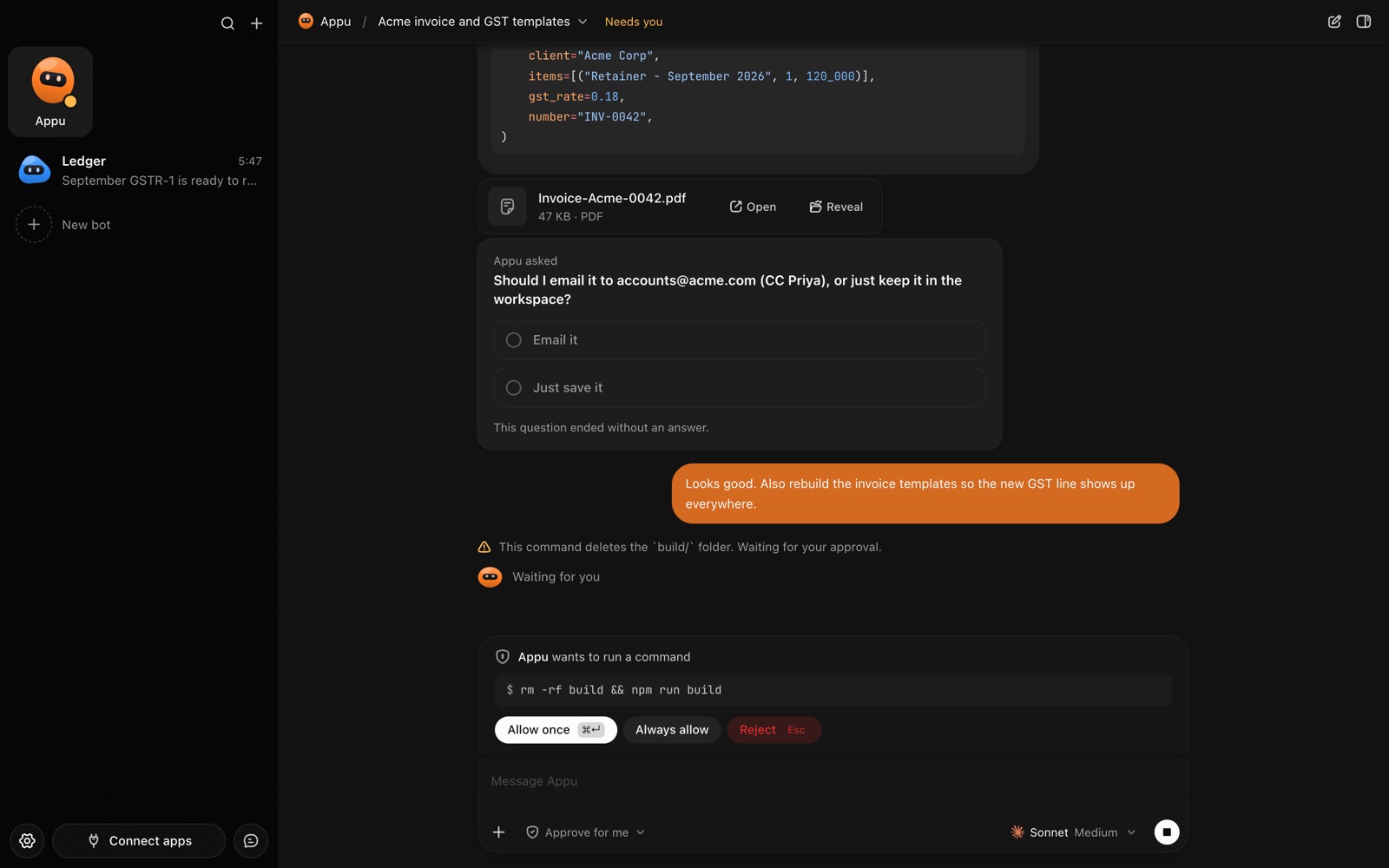
An AppuBot chat: the bot made an invoice PDF, asks a question and waits for approval before running a command
A bot finishing an invoice, asking a question and waiting for your OK.

What does an AI accounting assistant do day to day?

Most small-business bookkeeping is the same handful of steps every week: copy numbers from one place into another, produce a document, send it, then check it was paid. Those are the steps you can hand to an Accounting bot. You describe the job once, in plain words, and it does the clicking and typing while you keep the decisions.

  • Invoices from your sheet. It reads the next unbilled row of your time or orders sheet, fills the invoice in your accounting app, exports the PDF and sends it to you to check.
  • Payment follow-ups. It lists invoices past their due date and drafts a polite reminder for each, held for your approval.
  • Reconciliation help. It compares a bank export against your ledger and lists what doesn’t match, with the row numbers, so you only look at the exceptions.
  • Month-end pack. It gathers the reports you always pull (profit and loss, open invoices, VAT or sales tax totals) into one folder and writes a short summary.
  • Answers from the books. Ask it on Telegram "what did Northwind pay us this quarter?" and it looks it up for you.

Which apps does it work in?

Two ways, and you can mix them. With connected apps you sign in once and the bot can read and write in tools like QuickBooks, Xero, Stripe, Google Sheets and Gmail. With computer use it works in the desktop apps on your computer the way you would: it opens Numbers, Excel or your accounting software’s own app, finds fields by their names and fills them in. That second route matters for software with no connection at all, or for the one screen your accountant insists on.

How do you set it up in AppuBot?

  1. Download AppuBot and pick the AI it should use, for example your Claude or ChatGPT plan. No AppuBot account is needed.
  2. Make a new bot, name it "Accounting" and give it a one-line job, such as "Invoices and books for my studio".
  3. Paste instructions it should always follow. For example: “Invoices come from the sheet Billing 2026. One invoice per unbilled row, due in 14 days, in GBP. Export each as a PDF named Client - Invoice number. Never send an invoice or record a payment without asking me first. Anything over £5,000 or with a new client, flag it and stop.”
  4. Connect the apps it needs under Connect apps (your accounting tool, Sheets, Gmail) and leave on only those for this bot. Turn on computer use if it has to work in a desktop app.
  5. Set its approvals to "Approve for me", so anything important waits for you.
  6. Add a routine, for example every weekday at 8:00: “Create invoices for yesterday’s unbilled rows and send me the PDFs.”
  7. Optionally connect it to Telegram so the PDFs and questions reach your phone.

If a task is easier to show than to describe, press "Teach a task" and do it once while AppuBot watches. The bot saves it as a skill.


What does it ask you before doing?

On "Approve for me" the bot reads and looks things up freely, but asks before it acts in your accounts or does anything important on your computer, and it waits however long you take. You can tighten it further in its instructions. A sensible list for bookkeeping:

  • Sending. Every invoice, reminder or email to a client.
  • Money. Recording a payment, issuing a credit note, voiding anything.
  • New records. Creating a new customer or supplier.
  • Anything unusual. Amounts above your limit, missing tax details, or numbers that don’t add up.

What could a week look like?

WhenWhat the bot doesWhat you do
Weekdays 8:00Invoices yesterday’s work, exports PDFsApprove and send from Telegram
MondayLists overdue invoices, drafts remindersTweak the tone, approve
WednesdayMatches the bank export to the ledgerLook at the three rows it flagged
Month endBuilds the report pack and a summaryForward it to your accountant

An example schedule. What a bot can do depends on your apps, your instructions and the AI you use.

What it is not

An Accounting bot is an assistant, not an accountant. It can make mistakes, misread a scanned document or pick the wrong account, so check its work, especially anything that touches tax. It remembers your rates, clients and preferences in a memory you can read and edit, which helps it get closer to how you work over time.

Questions

Can an AI bot do my bookkeeping on its own?

It can do much of the routine work, but you should keep the sign-off. Set it to ask before sending or recording anything, and review its numbers like you would a new junior’s.

Does it work with QuickBooks or Xero?

Yes, through connected apps, and it can also use their apps or websites on your computer with computer use. You choose which apps this bot may use.

Does my financial data go to AppuBot?

No. Your files, chats and the bot’s memory stay on your computer. What the bot reads is sent to the AI provider you chose, like when you use that AI yourself.

Can it run while I’m away from my desk?

Yes, as long as your computer is on and AppuBot is running. Routines run on schedule and anything that needs you arrives on Telegram with buttons to approve.

What does it cost?

AppuBot is free during early access. The bot uses the AI plan you already have, such as Claude or ChatGPT.

Meet your first bot

An AI teammate that works on your Mac, and tells you on Telegram