
Skip to content
+HubSpot

HubSpot AI agent: let a bot keep your CRM up to date

Look up contacts and deals, log notes and draft follow-ups.

By Sarthak Gupta · Updated

The short answer

An AppuBot bot connected to HubSpot can look up contacts, companies and deals, log notes, update records and draft follow-ups. With "Approve for me" it asks before it creates or changes a CRM record. Searching and reading do not need approval.

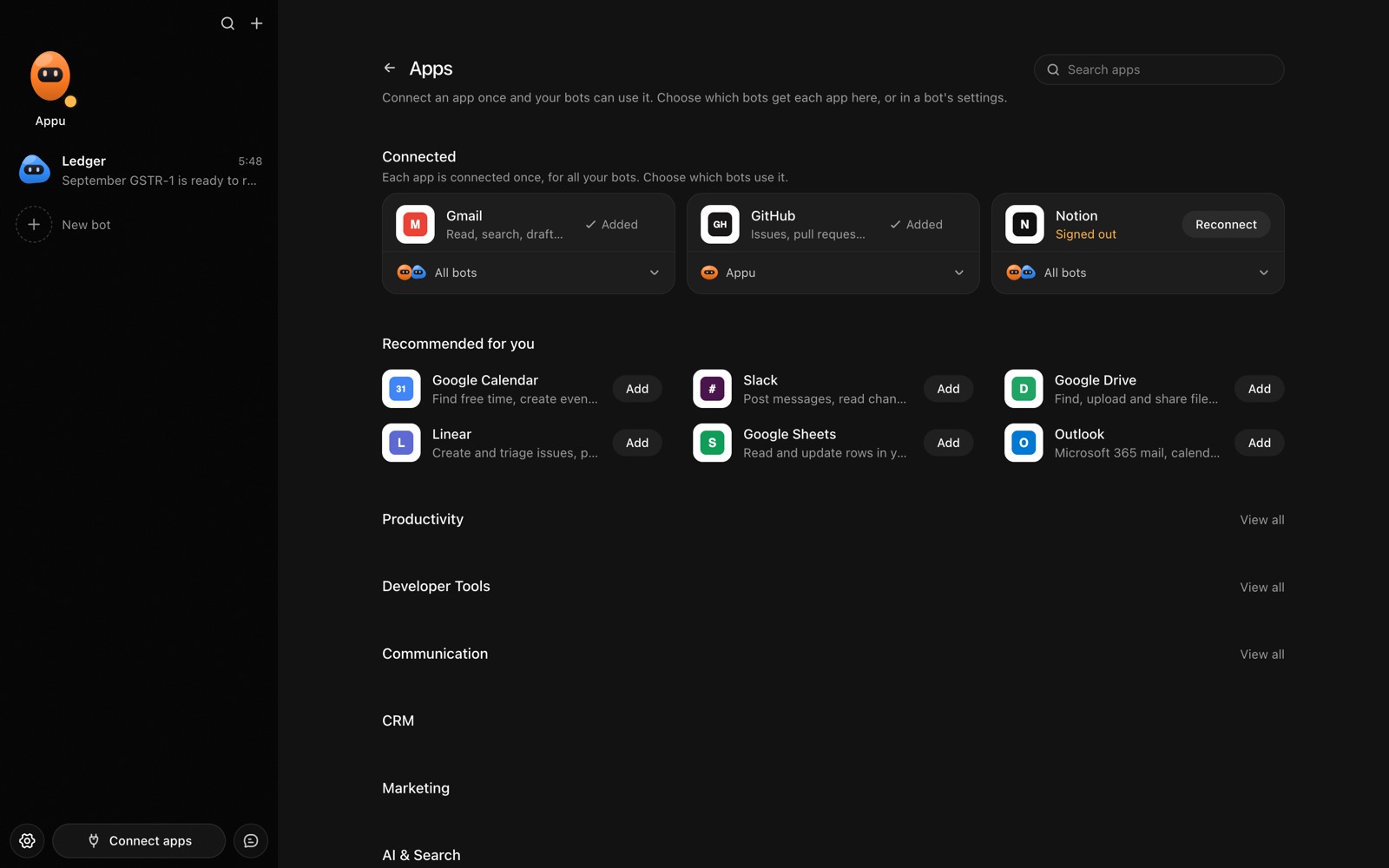
The Apps page in AppuBot with Gmail, GitHub and Notion connected and more apps to add
Connect an app once, then choose which bots may use it.

What can a bot do in HubSpot?

A CRM is only as good as its last update, and notes are the first thing to slip. A bot can log what happened and prepare you for the next conversation.

  • Look up a contact. Bring up the person, their company, the deal and the last interaction.
  • Log notes. Turn a call summary into a note on the right contact and deal.
  • Update deals. Move a deal to the next stage and set the next step and date.
  • Create records. Add a new contact or company from an email signature or a business card photo.
  • Prepare for a call. Collect history, open deals and recent emails into a short briefing.
  • Draft follow-ups. Write the next email in your tone for you to review.

What can you ask a bot to do in HubSpot?

These are the kinds of requests that work well. Type them in the app, or send them from your phone on Telegram.

  • "What is the status of the Fairview deal and when did we last talk?"
  • "Log a note on Ana Costa: asked for a revised quote, follow up Thursday."
  • "Move the Redwood deal to Proposal Sent."
  • "Create a contact from this email signature."
  • "Which open deals have had no activity for two weeks?"

How do you connect HubSpot to AppuBot?

  1. Open AppuBot on your computer.
  2. Click Connect apps in the sidebar to open the Apps page.
  3. Sign in once in your browser. This links AppuBot to your own account for connected apps, and you only do it the first time.
  4. Find HubSpot on the page and connect it. Your browser opens HubSpot's own sign-in and consent screen, and you approve it there.
  5. Switch HubSpot on for the bots that may use it. Each bot has its own switch, so a bot you did not choose never touches it.

The same Apps page lists about 1,700 other apps. Connecting one app once makes it available to every bot you allow.

Will it ask before it changes things in HubSpot?

Creating records, changing deal stages and logging notes change data your team depends on, so on "Approve for me" the bot shows the update first and waits. Looking up records goes ahead.

This follows the bot's permission choice. On "Approve for me" the bot asks before it acts in your account, and it waits as long as you take. Reads and searches go ahead without a question. On "Full access" it acts without asking, so keep that for bots you trust with the app. More in Approvals.


What should you know before relying on a bot in HubSpot?

A bot works through your own HubSpot account, so it can do what that account can do and nothing more. If a task fails, it tells you why in the chat instead of guessing.

Be specific about which project, folder, list or account you mean when you have several, and say once what the bot should never touch. You can save that in its memory so it applies to every chat. AppuBot is free during early access and needs no AppuBot account, and you keep using the AI plan you already have.

Which routines suit HubSpot?

Follow-up is the part sales work forgets, so a routine helps.

  • Stale-deal list. Mondays, list deals with no activity for two weeks.
  • Pre-call brief. Each morning, a short brief for the day's customer calls.
  • Weekly pipeline note. Fridays, a plain-language summary of the pipeline.

HubSpot with computer use and Telegram

The connection reads and writes CRM records. For a report or setting that only appears on screen, computer use lets the bot open HubSpot in the browser. Combined with Gmail, the bot can draft the email and log it in one go.

On Telegram you can send a voice note after a meeting and say "log this on the Redwood deal". It writes the note and confirms.

Is it private to use HubSpot with a bot?

It uses your own HubSpot account and sees the records your permissions allow. Customer details it reads go to its AI provider so it can answer, which is worth checking against your company's data rules. Turn HubSpot off per bot at any time.

Turn the app off for a bot at any time from its switch on the Apps page, and the bot loses access at once. You can also disconnect the app completely. See connected apps for how connections work.

Questions

Does it work with my team's custom properties?

It can read the fields your account can see. Describe unusual ones once and save the notes in its [memory](/features/memory).

Can it email my contacts?

It can draft email, and sending needs your approval on "Approve for me". Sending runs through [Gmail](/apps/gmail) or [Outlook](/apps/outlook) if you connect them.

Can it delete records?

Only if you ask, and it asks first on "Approve for me". Keep deletions a human step if you prefer.

How does it differ from Salesforce?

Different products, similar jobs. See the [Salesforce page](/apps/salesforce).

Meet your first bot

An AI teammate that works on your Mac, and tells you on Telegram