
Skip to content
+Shopify

Shopify AI agent: let a bot watch orders and products

Check orders, update products, draft replies and report on sales.

By Sarthak Gupta · Updated

The short answer

An AppuBot bot connected to Shopify can look up orders, customers and products, draft replies and report on sales. It can be set up to update product details. With "Approve for me" it asks before it changes anything in your store. Reading does not need approval.

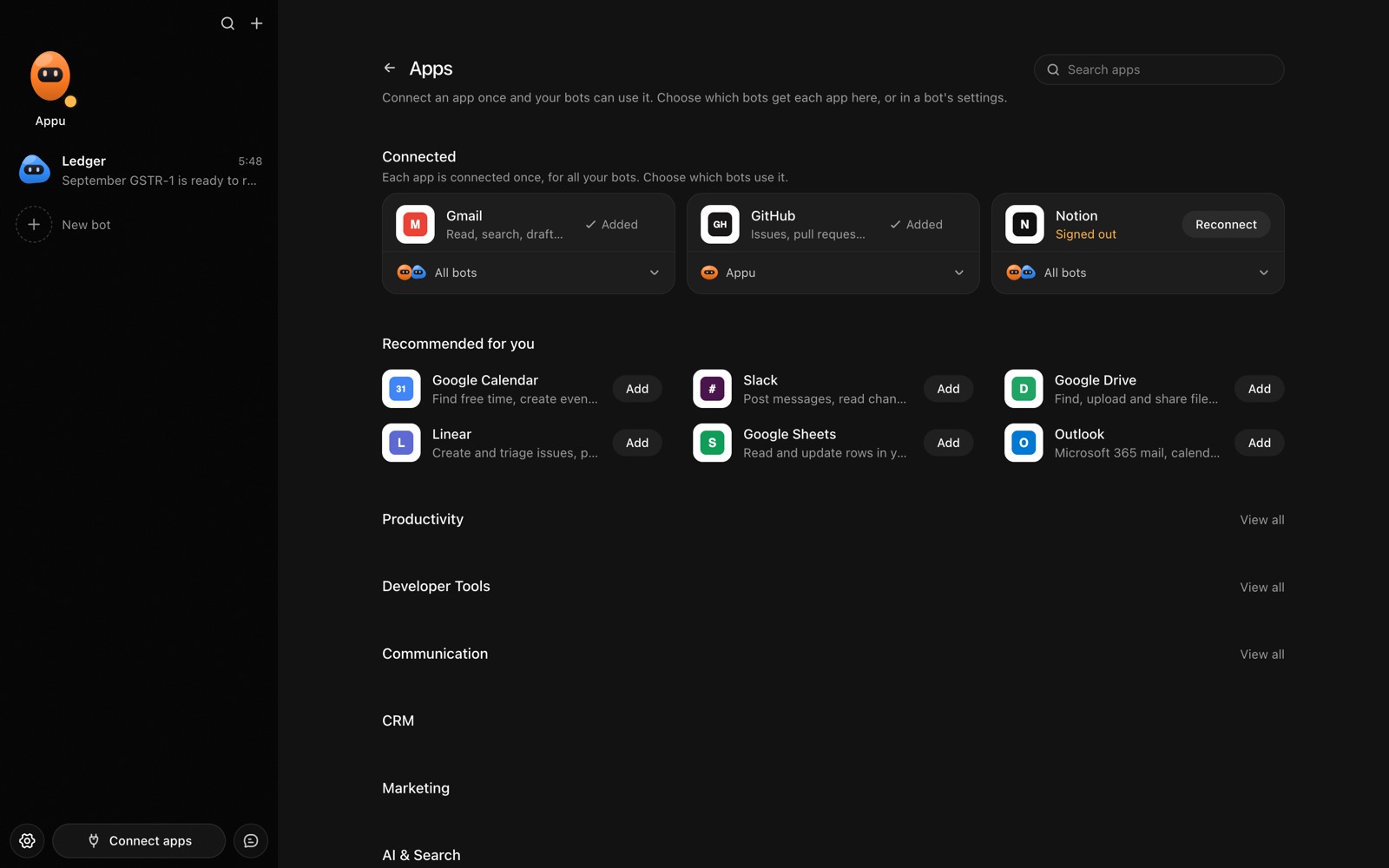
The Apps page in AppuBot with Gmail, GitHub and Notion connected and more apps to add
Connect an app once, then choose which bots may use it.

What can a bot do in Shopify?

Running a small store means many tiny tasks: checking an order, fixing a description, answering a customer. A bot can handle the lookups and the drafting.

  • Look up orders. Find an order by number, customer or status and tell you where it is.
  • Answer customers. Draft a reply about shipping or a return using the order's details.
  • Update products. Change a title, description, price or stock count when you tell it to.
  • Report on sales. Summarise orders for a day or week by product.
  • Find problems. List unfulfilled orders and products that are out of stock.
  • Prepare books. Pull a period's orders into a sheet for your accountant.

What can you ask a bot to do in Shopify?

These are the kinds of requests that work well. Type them in the app, or send them from your phone on Telegram.

  • "Where is order 1042 and when did it ship?"
  • "Which orders from the last two days are still unfulfilled?"
  • "Update the description of the linen shirt to say it is available in blue."
  • "Draft a reply to Sofia, whose parcel is late."
  • "Summarise last week's sales by product."

How do you connect Shopify to AppuBot?

  1. Open AppuBot on your computer.
  2. Click Connect apps in the sidebar to open the Apps page.
  3. Sign in once in your browser. This links AppuBot to your own account for connected apps, and you only do it the first time.
  4. Find Shopify on the page and connect it. Your browser opens Shopify's own sign-in and consent screen, and you approve it there.
  5. Switch Shopify on for the bots that may use it. Each bot has its own switch, so a bot you did not choose never touches it.

The same Apps page lists about 1,700 other apps. Connecting one app once makes it available to every bot you allow.

Will it ask before it changes things in Shopify?

Changing prices, products or orders affects what customers see and pay, so on "Approve for me" the bot shows the change first. Looking up orders and reporting goes ahead.

This follows the bot's permission choice. On "Approve for me" the bot asks before it acts in your account, and it waits as long as you take. Reads and searches go ahead without a question. On "Full access" it acts without asking, so keep that for bots you trust with the app. More in Approvals.


What should you know before relying on a bot in Shopify?

A bot works through your own Shopify account, so it can do what that account can do and nothing more. If a task fails, it tells you why in the chat instead of guessing.

Be specific about which project, folder, list or account you mean when you have several, and say once what the bot should never touch. You can save that in its memory so it applies to every chat. AppuBot is free during early access and needs no AppuBot account, and you keep using the AI plan you already have.

Which routines suit Shopify?

A shop needs checking every day, which suits a routine.

  • Morning orders. Each morning, list new and unfulfilled orders.
  • Low-stock alert. Daily, report products running out.
  • Weekly sales note. Mondays, summarise last week's sales.

Shopify with computer use and Telegram

The connection reads and updates store data. For a job that lives in the admin screens, such as a theme change or a shipping label printed on your computer, computer use lets the bot work in the browser or app. Send sales figures to Google Sheets for the books.

On Telegram you can ask "how many orders today?" from the stockroom, or forward a customer's question and approve the bot's drafted reply.

Is it private to use Shopify with a bot?

It uses your own Shopify store account and sees the data your access allows, including customer details. What it reads goes to its AI provider to be worked on, so consider your customers' privacy and your own policy. Turn Shopify off per bot when needed.

Turn the app off for a bot at any time from its switch on the Apps page, and the bot loses access at once. You can also disconnect the app completely. See connected apps for how connections work.

Questions

Can a bot refund an order?

It can be set up to, but refunds move money, so keep it on "Approve for me" and approve each one yourself.

Can it change prices across many products?

It can, and on "Approve for me" you see the plan first. For big changes, ask for a summary of the planned changes first.

Does it work with more than one store?

It uses the account you sign in with. Name the store when you ask.

Can it do my payments reports?

For payments, connect [Stripe](/apps/stripe) too.

Meet your first bot

An AI teammate that works on your Mac, and tells you on Telegram